
To write a formula that can be copied to a large range needs an understanding of the functions being used, as shown in this example which uses VLOOKUP.
The following table holds information about some UK cities.
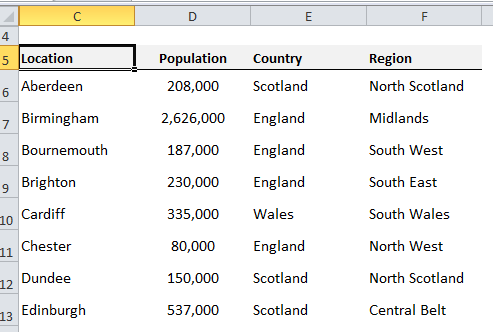
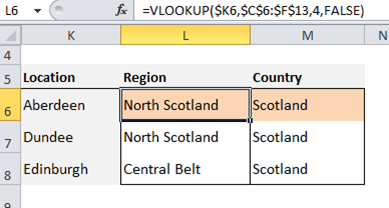
In another table VLOOKUP is used to display the Region and Country for selected cities.
The first version has two formula ranges and two formula master cells (L6 and M6 - see below). Each range has a border, and the master cells are formatted with a pink background.
The formulas contain the column offset values (4 for Region and 3 for Country) that VLOOKUP needs. One weakness of VLOOKUP is that a hard-coded offset value does not change when copied across columns.
There is also no blank column separating the two formula ranges. It would be easy to accidentally copy L6 across both ranges.
The second version now has just one formula range (L6:M8) with the formula master cell in L6. Input cells (L3 and M3), labelled Column Index, have been added. The master formula in L6 now refers to cell L3. By anchoring the row number in the formula (L$3), L6 can be copied to all of L6:M8.
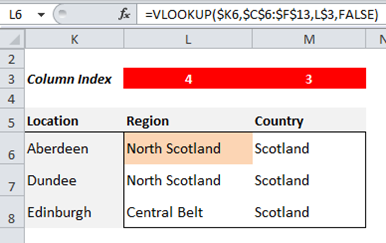
This can still be improved further. Cells L3 and M3, which hold the column offset values, are hard-coded with these values. They are formatted with a red background (Red for Danger!!) as hard-coded cells are the riskiest in any spreadsheet.
If the source data table changes in any way - for example if the Population column is deleted - the values in L3 and M3 will need to be manually updated.
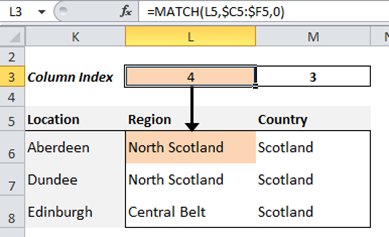
For a dynamic method to update these column indexes, the MATCH function can be used. In this final version, the formula in L3 uses MATCH to find the word 'Region' in cell L5 in the column headings of the data table.
The formula in L3 can be copied into M3, creating another formula range and master cell. Changes to the source data table are now less likely to impact the output table. If necessary, an error check could be included to show if 'Region' or 'Country' are not matched.
When designing spreadsheets, always consider: How can I make this difficult to break?
Formula ranges can be a very effective way of making your spreadsheets more robust.