
If a spreadsheet is slow to refresh and re-calculate then one possible cause is that too many volatile functions are being used.
Most Excel functions only re-calculate when the cells they refer to are changed. Suppose a cell contains the simple formula =SUM (B5:B10). This will only re-calculate if any of cells B5 to B10 change.
But a Volatile Function will re-calculate whenever any cell in the spreadsheet changes!
The good news is that there are relatively few volatile functions - but it is useful to know about them and avoid where possible. One that is commonly used is OFFSET - so we will look at a non-volatile alternative, the INDEX function.
It is usually straightforward to replace OFFSET with INDEX - as this example shows.
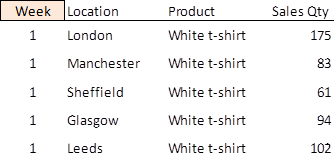
From the data table above, we want to write a formula that retrieves the value of sales in Sheffield (61).
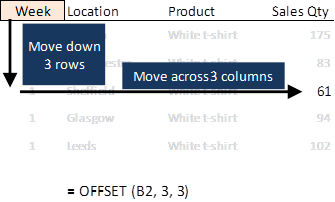
We will take cell B2 (highlighted) as the reference cell. Our target cell is E5, 3 rows down and 3 columns across from B2. So the formula needed is simply = OFFSET (B2, 3, 3).
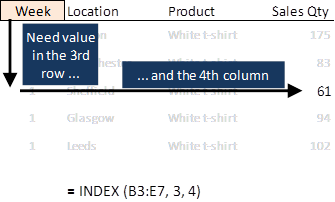
The syntax for the INDEX function is: = INDEX (array, row_num, [col_num] ).
The col_num input is only optional if the array is one column wide - so for consistency it is best to always include col_num, even if it is 1.
For our data table, the array is cells B3:E7. The row_num value is 3 but the col_num value needs to be 4 in order to refer to the 4th column in the array.
Volatile functions, such as OFFSET, can slow down Excel.
INDEX is a good replacement for OFFSET that is simple to use in most situations.